
We shipped a retrieval pipeline over an internal knowledge base. It passed everything we ran at it, schema checks, retrieval precision, a set of manually reviewed answers, and it looked clean in production for weeks. Then someone flagged an answer that confidently cited a superseded policy. The traces showed the pattern had been there from the first week, at a rate low enough to slip through spot checks. An LLM judge closes that gap, but only once it is calibrated: a judge nobody has aligned against human labels produces scores that are precise, continuous and unrelated to your team’s standards. This post covers wiring one with openevals, why the scale debate is a distraction, the biases that inflate your baseline, and the calibration flow LangSmith actually documents today.
What changed since this was first written. The calibration section was built on Align Evals as a compare-scores-side-by-side feature. That name no longer appears anywhere in the LangSmith documentation. The flow is now Align Evaluator, built on annotation queues and an Evaluator Playground, and it covers online evaluation as well as offline. The
openevalscode sample was also wrong: it used the LangSmith UI’s mustache placeholders in an SDK prompt, where the SDK takes f-string variables. Both are rebuilt against current docs and the shipped package.
Why the failures that matter resist programmatic tests
The instinct after shipping is to add more tests. It does not help, because the failure modes that hurt, hallucination above all, have no clean programmatic definition. LangSmith’s own documentation opens on exactly this point: “LLM applications can be challenging to evaluate since they often generate conversational text with no single correct answer” (LangSmith, “How to define an LLM-as-a-judge evaluator”).
Surface metrics measure the wrong thing. Token overlap and embedding similarity will tell you an answer is close to a reference and miss a factual inversion completely, because a response that states the opposite of the reference in the same vocabulary scores well. Schema and regex checks catch structural failures and say nothing about the content inside the structure: well formed JSON with three invented bullet points passes every validator you write.
What is left is semantic quality, which is the thing that decides whether anyone can trust the output. Rules cannot measure it and humans cannot measure it at volume. A judge sits between the two: a capable model scores an output against explicit criteria and returns a verdict plus its reasoning.
The evidence for that being workable is older than the tooling. Zheng et al. introduced the LLM-as-judge benchmark alongside MT-Bench and Chatbot Arena in 2023, reporting that strong judges reach “over 80% agreement, the same level of agreement between humans”, with 85% against expert humans on non-tie cases against an 81% human to human baseline (Zheng et al., “Judging LLM-as-a-Judge with MT-Bench and Chatbot Arena”). Carry the caveat with the number: that is non-tie cases, on 2023 models, on open-ended chat. It establishes that the approach is sound, not that your judge is.
Wiring a judge with openevals
openevals is LangChain’s evaluator package. It ships prebuilt prompts for common dimensions and a factory for custom ones.
pip install openevals langsmithfrom openevals.llm import create_llm_as_judge
from openevals.prompts import CORRECTNESS_PROMPT
evaluator = create_llm_as_judge(
prompt=CORRECTNESS_PROMPT,
model=JUDGE_MODEL,
)
result = evaluator(
inputs="Refund window on enterprise contracts?",
outputs="Enterprise contracts have 30 days, per 4.2.",
reference_outputs="Enterprise: 30 days, section 4.2.",
)The variable syntax is the thing to get right, and it differs between the SDK and the UI. openevals prompts are plain f-strings with single braces, and the conventional names are plural: {inputs}, {outputs}, {reference_outputs}. The LangSmith UI evaluator uses mustache by default, so there you write {{prompt_var}}, with single braces available if you switch that prompt to f-string formatting. Copying the UI’s double braces into an SDK prompt gives you a prompt whose placeholders are never filled, and no error to tell you.
A custom prompt can also require extra variables of your own, passed as keyword arguments when you call the evaluator. For a retrieval pipeline that is the right shape, because the retrieved context deserves its own slot rather than being smuggled in as the reference:
FAITHFULNESS_PROMPT = """
Decide whether the response is grounded in the context.

- PASS: every factual claim is supported by the context
- FAIL: any claim is absent from or contradicted by the context

<context>
{context}
</context>

<input>
{inputs}
</input>

<output>
{outputs}
</output>

Work through each claim against the context before scoring.
"""

faithfulness_judge = create_llm_as_judge(
    prompt=FAITHFULNESS_PROMPT,
    model=JUDGE_MODEL,
)
What that judge can catch is bounded by what retrieval handed the model in the first place, the stack we walk end to end in Enterprise RAG on LangChain: fix retrieval first.
To run it over a dataset, use the LangSmith client. The current documented form is a method on the client, not a module-level import from a submodule:
from langsmith import Client

ls_client = Client()

results = ls_client.evaluate(
    run_rag_pipeline,
    data="rag-golden-dataset",
    evaluators=[faithfulness_judge],
    experiment_prefix="faithfulness-v2",
    max_concurrency=4,
)
max_concurrency is worth setting from the start rather than discovering later. LangSmith records every run, score and reasoning trace as an experiment, so pass rates can be diffed between pinned prompt versions to catch a regression before it ships. Once a judge is calibrated, its verdict is also a candidate input to a deterministic confidence gate rather than only a dashboard number.
The scale question is a distraction
The original version of this post asserted that numeric scales measurably wreck judge consistency, citing a figure we could not trace to any source. Here is what is actually defensible.
openevals gives you three shapes and binary is the default: continuous is a boolean that returns a float between 0 and 1 and defaults to False, while choices takes a list of specific permitted scores such as [0.0, 0.5, 1.0]. The two are mutually exclusive. The LangSmith UI mirrors this with three feedback types: Boolean, Categorical and Continuous.
The package documentation attaches a warning to both non-binary options that matters more than the choice between them: “you should make sure that your prompt is grounded in information on what specific scores mean”, and it is emphatic that the prebuilt prompts in the repo do not carry that information (OpenEvals README).
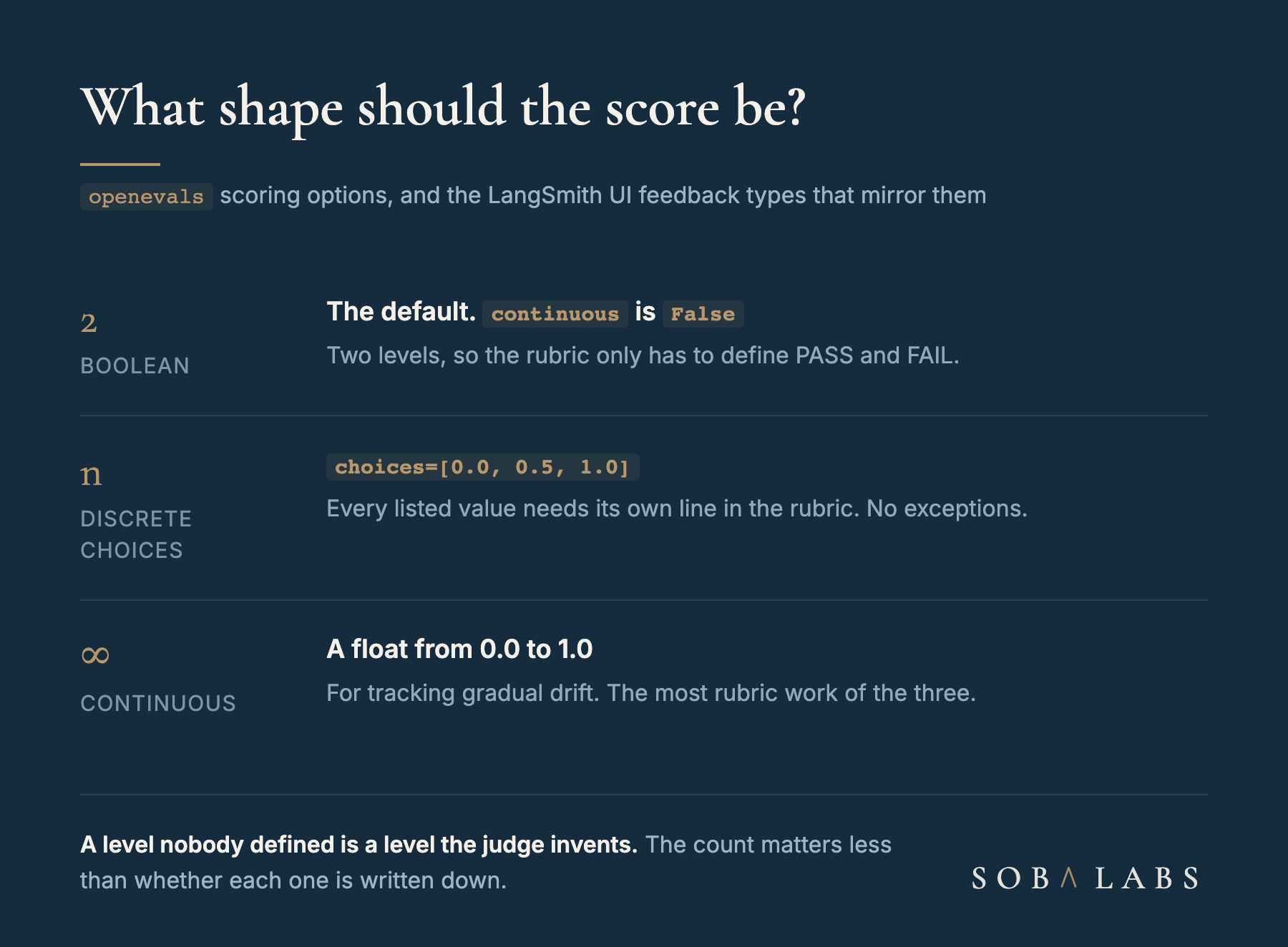
So the rule is not “binary is more consistent”, which is contested in the literature and keeps moving. The rule is that every level you offer must be defined in the rubric. Binary is the sane default because two levels are the cheapest to define well, and a value like 0.5 earns its place only when you have written down what a 0.5 is. Reach for continuous when you genuinely need to watch gradual drift, and expect to do the most rubric work there.
The biases that inflate your baseline
A judge deployed without knowing its failure modes reports flattering numbers. The first three below were named in the original MT-Bench work; the last two are operational.
- Position bias. In pairwise comparison, the judge favours whichever response it saw first. Randomise presentation order across runs.
- Verbosity bias. Longer answers score better regardless of quality. Put “penalise unnecessary detail” in the criteria explicitly.
- Self-enhancement bias. A judge over-scores outputs from its own model family. This is the one that quietly poisons a dashboard, because it raises the baseline uniformly and therefore hides degradation rather than causing an obvious spike.
- Non-determinism. The same input scores differently across runs. Pin temperature to zero and prefer fewer, well defined levels.
- Undefined levels. Covered above, and the most common of the five in practice.
The rule worth enforcing in review. Judge with a different model family from the one generating the output. Do not encode this as a pair of model names, because those turn over every few months. Encode it as the constraint: whatever family serves production, the judge comes from another vendor, and you re-check that the day you switch either one.
Calibrating with Align Evaluator
This is the section the port changed most, because the feature the original described no longer exists under that name. Align Evals launched in July 2025 as a side-by-side score comparison. What LangSmith documents now is Align Evaluator, and it is a different workflow built on annotation queues.
The documented flow runs in four steps (LangSmith, “Improve LLM-as-judge evaluators using human feedback”):
- Select experiments or runs carrying real outputs from your application.
- Add them to an annotation queue where a human expert labels them, then Add to Reference Dataset.
- Test the evaluator prompt against those labels in the Evaluator Playground, using Start Alignment.
- Refine and repeat, adjusting the prompt where evaluator and human disagree.
Two numbers come from the documentation rather than from anyone’s intuition. LangSmith recommends at least 20 labeled examples to start, and it recommends they be “balanced in both 0 and 1 labels”, which is the part teams skip: a set of mostly-passing examples cannot show you a judge that never fails anything. The output is a single figure, defined plainly: “The alignment score is the percentage of examples where the evaluator’s judgment matches that of the human expert.”
Human corrections are not thrown away either. Editing a score in the comparison view or the runs table stores a correction, and with few-shot evaluators enabled those corrections are inserted into the prompt automatically. LangSmith’s concepts page is blunt that this is expected work, not a nicety: “LLM-as-judge evaluators require careful review of scores and prompt tuning” (LangSmith, “Evaluation concepts”). Corrections are also available through the SDK via update_feedback with a correction dictionary, so an existing review tool can feed the same loop.
The practical sequencing has not changed even though the feature has. Do not wait for a perfect golden dataset. Twenty labeled examples covering strong outputs, weak outputs and the edge cases you actually see will surface a systematically wrong judge faster than a month of collecting.
What a judge is for, and what it is not
A judge is a regression signal, one instrument inside a wider evaluation practice. It tells you that this week’s pass rate moved against last week’s on criteria you defined and calibrated. It does not tell you about the failure nobody has thought of yet, and it never stops needing periodic human review of outliers. The reasoning it returns is an artifact to spot-check, not evidence in itself, for the same reason an agent’s summary is not a source.
Three things carry forward.
- Get the variable syntax right per surface.
openevalsprompts are f-strings with{inputs},{outputs},{reference_outputs}, and extra variables of your own. The UI defaults to mustache. A placeholder that never fills produces a confident score against a prompt with a literal{{output}}in it. - Define every level you offer. Binary by default,
choiceswhen a middle value has a written meaning,continuousonly for drift. The prebuilt prompts do not define score meanings for you. - Calibrate before you trust it, and start small. Twenty balanced labeled examples through Align Evaluator, then iterate on the alignment score. An uncalibrated judge is not a weak signal, it is a confident wrong one.
Building an evaluation pipeline for an AI application? Book a call.
Sources
- LangSmith, “How to define an LLM-as-a-judge evaluator”: the current UI flow, evaluator templates, variable mapping and the three feedback types.
- LangSmith, “Improve LLM-as-judge evaluators using human feedback”: the Align Evaluator workflow, the twenty-example recommendation and the alignment-score definition.
- OpenEvals README: the shipped
create_llm_as_judgeAPI, prompt variable conventions, and thecontinuousandchoicesscoring options. - LangSmith, “How to evaluate an application”: the current
client.evaluate()form and its arguments. - LangSmith, “Evaluation concepts”: reference-free against reference-based judges, and few-shot evaluators.
- Zheng et al., “Judging LLM-as-a-Judge with MT-Bench and Chatbot Arena”: the 2023 work establishing judge-to-human agreement and naming the position, verbosity and self-enhancement biases.
Last updated: