
We have shipped a number of LangGraph agents, several of them into production, and every new project reopens the same questions. How should langgraph.json be configured? Which multi-agent pattern fits this problem? Where do retries, state and deployment go? The patterns exist and are well documented. They are just never in front of you at the moment you need them, so the cost is not learning them once, it is re-finding them on every project. langchain-agent-skills is our open-source answer: production LangChain patterns packaged as agent skills that a coding assistant loads on its own, exactly when the task calls for them. This post covers why documentation alone does not close the gap, how progressive disclosure keeps the cost near zero, what the ten skills cover, and how to install them.
Open source, and genuinely community-built. The repository is MIT licensed and has passed 100 GitHub stars with 15 forks. If you build with LangChain, LangGraph or LangSmith, issues and pull requests are welcome.
Why good documentation still leaves a gap
LangChain, LangGraph and LangSmith are well documented. There are guides, API references, working examples, and MCP servers you can point an assistant at (since version 1.4, MCP support ships inside LangChain itself, covered in MCP is now built into LangChain). The limitation is not quality, it is that documentation is not contextual.
When you are implementing a supervisor pattern with three specialised agents, you do not want to search for “LangGraph supervisor pattern”, read an example, work out which parts apply, and adapt them to your schema. You want the assistant to already know the pattern and apply it to the code in front of it.
That difference plays out step by step. The documentation workflow is: search for the right page, read the examples, find the relevant parts, adapt the snippets to your schema, debug the configuration by hand, then repeat the whole loop for the next problem. The skills workflow is: the assistant detects the task from what you asked, loads the matching skill, and applies a pattern that already carries the scripts and checks. The second one is reusable across projects. The first one is re-done every time.
The gap is not information. It is availability at the moment of work.
These are the friction points that recur on essentially every project:
langgraph.jsonconfiguration. What is the schema, how are environment variables wired, which dependencies are required.- State reducer patterns. When
operator.addis right and when you need a custom reducer. - Retry policy setup. Which backoff strategy, and how an LLM recovery loop should be structured.
- Deployment model. Cloud, hybrid or standalone, and what monitoring follows from the choice.
- Observability and evaluation. What is worth tracing, and how to design an eval dataset that catches regressions.
A general-purpose assistant is good at general programming and does not know any of this. It is the specific, unglamorous knowledge that separates an agent that demos from an agent that runs.
How progressive disclosure keeps the context cost near zero
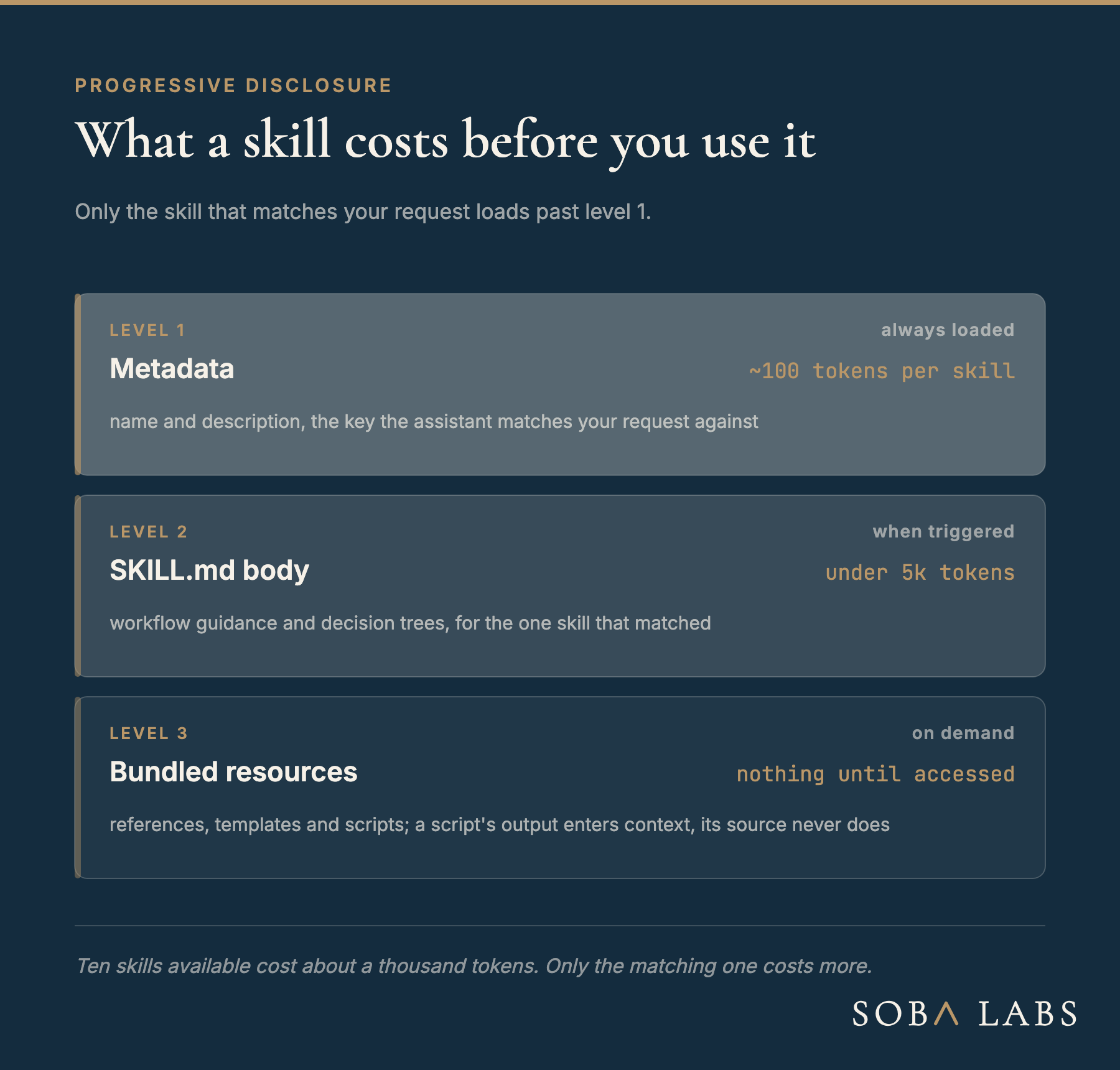
The obvious objection to packaging knowledge for an assistant is that it will flood the context window. Agent skills are built to avoid exactly that. Anthropic’s documentation describes the mechanism as progressive disclosure, where “Claude loads information in stages as needed, rather than consuming context upfront” (Anthropic, “Agent Skills”).
The staging is what makes it cheap, and the published numbers are specific:
- Level 1, metadata, always loaded. The
nameanddescriptionfrom the YAML frontmatter, costing roughly 100 tokens per skill. This is the semantic key the assistant matches your request against. - Level 2, the SKILL.md body, loaded only when triggered. Workflow guidance and decision trees, under 5k tokens.
- Level 3, bundled resources, loaded on demand. References, templates and executable scripts, costing nothing until accessed. A script’s output enters the context; its source never does.
As Anthropic puts it, “until a Skill is triggered, only its name and description occupy context.” That is what makes a large library practical: at roughly 100 tokens each, our ten skills cost about a thousand tokens to have available, and only the one that matches ever costs more.
The same discipline applies when writing one. The description field carries a hard limit of 1024 characters and does the entire job of triggering, so it has to say both what the skill does and when to use it. In our repository nine of the ten SKILL.md files sit under 500 lines, and the one exception is the agent-patterns skill at 565, because it carries four complete patterns. Everything deeper lives in references/ and loads only if the task reaches for it.
This is the same lever we wrote about in context engineering in deep agents, applied one layer out: there it governs what a running agent keeps, here it governs what a coding assistant ever loads.
What the ten skills cover
The repository ships ten skills across the LangGraph, LangSmith and Deep Agents lifecycle, grouped into three installable bundles.
LangGraph, the build stage. langgraph-project-setup initialises projects, generating langgraph.json with a valid schema and .env templates for the major providers. langgraph-agent-patterns carries the multi-agent coordination patterns from the LangGraph documentation, supervisor, router, orchestrator-worker and handoffs, each with a decision tree for when to choose it and, more usefully, when not to. langgraph-state-management covers state schemas, reducers and persistence backends. langgraph-error-handling covers the production-readiness layer: classifying failures as transient, recoverable or user-fixable, then routing each to the right mechanism, RetryPolicy for transient errors, an LLM recovery loop for bad tool arguments, and interrupt() for the ones that need a person.
That last split is worth stating on its own, because it is the decision teams most often skip. A 429 or a timeout is a retry. A malformed tool call is a recovery loop. A missing piece of information is a human. Collapsing all three into one generic retry is how agents end up quietly failing in production, which is the same argument we made for deterministic confidence gates.
LangSmith, the operate stage. langgraph-testing-evaluation covers unit tests for individual nodes, trajectory evaluation for whole workflows, and dataset integration. langsmith-trace-analyzer fetches and organises traces by outcome so failure patterns are visible rather than anecdotal. langsmith-deployment covers the Cloud, Hybrid and Standalone choice, config validation, and the monitoring that follows.
Deep Agents, added since the first release. deepagents-setup-configuration initialises and troubleshoots deep agent projects, and deepagents-planning-todos covers using the write_todos tool for task decomposition. These arrived after we wrote up what the deepagents harness gives you and what you still own, and they encode the setup half of that post.
And one that builds the others. skill-creator is included in all three bundles, because the most common thing a team wants after using these is to package its own patterns the same way.
Installing them
Add the marketplace, then install a bundle:
/plugin marketplace add soba-labs/langchain-agent-skills
/plugin install langgraph-skills@soba-labs-langchain-agent-skills
The three bundles are langgraph-skills, langsmith-skills and deepagents-skills, and /plugin menu gives you an interactive picker instead. Claude Code’s own skills documentation covers the wider mechanism, including personal and project-level skill directories. After that the triggering is automatic. Ask for retry logic on a LangGraph agent and the assistant loads langgraph-error-handling on its own, because that skill’s description names both the capability and the situation.
The architecture is deliberately platform-agnostic, and not just in principle: a skill is structured markdown plus scripts, and Claude Code, Codex and OpenCode all read the same SKILL.md, with the same frontmatter and the same progressive disclosure. There is no porting step. The format is not even Anthropic’s anymore: Agent Skills moved to the Linux Foundation’s agent fund in October 2026, which makes it a safe target for a team’s internal knowledge. What differs between them is only where they look.
Codex reads skills from .agents/skills in a repository and ~/.agents/skills globally, per OpenAI’s customization documentation:
git clone \
  https://github.com/soba-labs/langchain-agent-skills.git
mkdir -p ~/.agents/skills
cp -r langchain-agent-skills/skills/* ~/.agents/skills/
The repository also ships a .codex-plugin/plugin.json, so it installs as a Codex plugin instead of being copied by hand. A skills-only plugin is just that manifest beside a skills/ directory (OpenAI, “Build plugins”).
OpenCode is the most permissive of the three. It reads .opencode/skills/, .claude/skills/ and .agents/skills/, plus the global equivalents, so either placement above already works.
And for any assistant with no skills mechanism at all, the files are still just markdown. Pointing it at skills/langsmith-deployment/SKILL.md works.
One caveat that applies to every skill you install from anywhere, ours included. Anthropic’s guidance is to “use Skills only from trusted sources”, because a skill can direct an assistant to run code. Read what you install. That is a reasonable ask of a repository you can audit in an afternoon, and it is the main argument for keeping skills open source rather than shipping them as an opaque product.
The takeaway
If you are building production LangGraph agents, a context-aware assistant beats a documentation search, and the cost of making it context-aware is far lower than it looks. Skills are the packaging format that makes domain knowledge loadable rather than pasteable.
Three things carry over even if you never install ours:
- Package the pattern, not the prose. A skill that ships a working
langgraph.jsonand a validation script is worth more than a page describing one. - Let the description do the triggering. It is the only part always in context, so it has to name the capability and the situation, in 1024 characters or fewer.
- Push depth down a level. Keep the body short and put the detail in references, so having the skill available costs almost nothing.
That is how we build agentic systems at Soba Labs, and the repository is the part of it we can hand over directly. It is MIT licensed and open to contributions: if you have solved a recurring LangChain problem, it belongs in a skill rather than in your last project’s codebase.
Sources
- langchain-agent-skills on GitHub: the repository, MIT licensed, ten skills in three bundles
- Anthropic, “Agent Skills”: progressive disclosure, the three loading levels and their token costs, and the security guidance
- Anthropic, “Equipping agents for the real world with Agent Skills”: the architecture and the thinking behind it
- Claude Code, “Skills”: creating and managing skills in Claude Code
- OpenAI, “Customization”: where Codex reads skills from, and the same three-level loading model
- OpenAI, “Build plugins”: the
.codex-plugin/plugin.jsonmanifest that makes a skills directory installable in Codex - LangGraph documentation: the framework the LangGraph skills target
- LangSmith documentation: tracing, evaluation and deployment