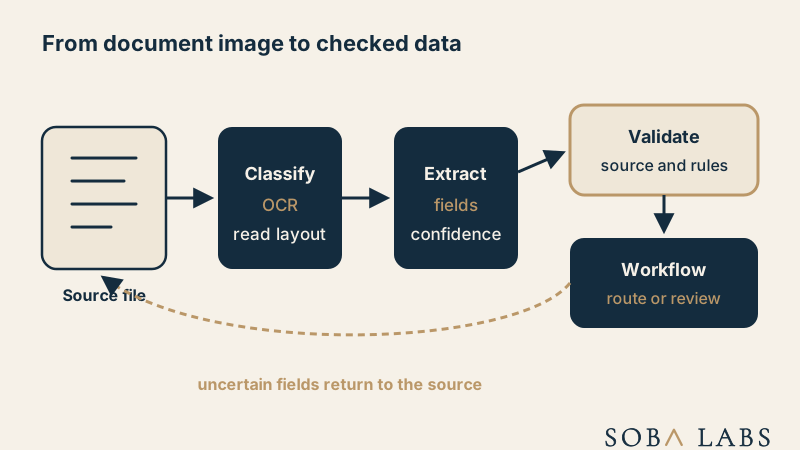
What does a Document AI pipeline do?
A pipeline first identifies the document type and relevant pages. It may run optical character recognition, detect tables and layout, extract named fields, and return structured output. Google Cloud describes Document AI as transforming unstructured document data into structured data. Each stage can fail independently and should expose evidence back to the source page.
An invoice flow might extract supplier, number, dates, currency, totals, tax, and line items. A contract flow may find parties, effective dates, renewal language, and obligations. The schema depends on the workflow. Generic extraction without a defined consumer often creates data that looks useful but cannot safely drive an action.
How is Document AI different from OCR?
OCR converts visible characters into machine-readable text. Document AI also uses document type, layout, labels, tables, and relationships to assign meaning. OCR may read “1,250.00,” while Document AI decides whether that value is a subtotal, tax amount, or final total.
A multimodal LLM can answer broader questions about a page and handle varied layouts. A specialized extractor may provide more predictable fields and coordinates for a stable document family. Many production systems combine both, then apply deterministic validation before accepting the result.
Where does it fit in a business workflow?
Use it to reduce manual entry, classify incoming work, prepare records, and route exceptions. Workflow automation can apply deterministic rules after extraction. The document remains the evidence, while extracted data is a claim about that evidence. Store page references or bounding regions so a reviewer can return to the exact source.
Validation should match the consequence. A low-risk routing label may tolerate an automatic result. A payment amount, identity field, or contractual obligation may require totals, cross-field checks, database comparison, or human approval. Never let a confident extraction overwrite the source of truth without a check.
How should teams evaluate it?
Build a test set from real document families, including scans, photos, rotated pages, handwriting, unusual layouts, and missing fields. Measure field accuracy rather than only character accuracy. Track whether the workflow made the correct final decision. A pipeline succeeds when the resulting business action is correct and traceable.
Monitor errors by document type and field because averages hide expensive failures. Keep uncertain or invalid results out of automatic actions. When layouts change, rerun the test set and inspect source-linked examples before treating the new extraction as production ready.